I want to keep on my education in master.
I want to go to Sweden university.
Author: admin
How to Solve Windows 7 Unbootable Post MFT Corruption
MFT (Master File Table) is probably the most critical system (metadata) files, which stores information about all the files and folders on a NTFS (New Technology File System) volume. It acts as a beginning point for mounting an NTFS based hard drive. Corruption in MFT can be caused due to various factors, including operating system corruption, file system damage, fatal virus attack, and human errors. Once the MFT gets corrupted, the MBR (Master Boot Record) is unable to read the information stored on the hard drive, resulting into halting the booting of your computer system. This further results into inaccessibility of hard drive data. To overcome the hazards created after MFT corruption, most of the users perform restoration of data from an adequate backup. However, unavailability of data backup leaves you with no option, but to use a third-party data recovery software, which can systematically recover your lost data.
As a practical case, you receive the below error message while attempting to boot your Windows 7 operating system:
“Recovering orphaned file xxxx. Insufficient disk space to recover lost data“
However, even after running CHKDSK, the drive remains corrupt and you receive another error message:
“$MFT read error“
The drive remains unbootable after any of the above error message appear.
Cause:
The root cause for the above error message is MFT corruption.
Resolution:
To resolve the above error message and to access the database, you will need to format your computer system. Formatting is a process that installs a new file system that allows you to boot your system. While your system becomes bootable, the stored in it gets deleted post formatting. For recovery of data after formatting, you will need to download an effective third-party data recovery tool from the Internet.
A data recovery software incorporates high end scanning methods to comprehensively scan the hard drive and recover maximum possible data. The software comes with highly interactive help manual, which makes it easy to understand without any former technical knowledge. It is completely non destructive in nature.
Stellar Phoenix Windows Data Recovery provides maximum Data Recovery in comparison to other applications. The software supports almost all Windows operating systems, including 7, Vista, XP, 2003, and 2000. Compatible with FAT12, FAT16, FAT32, VFAT, NTFS, and NTFS5 file systems, the software recovers data after almost all data loss scenarios.
Three Major Ways to Save Yourself From Online Identity Theft
A crime that happens every two minutes, online identity theft is among the worst things that can happen to anyone at any time by ruining their credit card score and destroying their financial reputation for many years to come.With the expansions in technology, the strategies used by the computer hackers and identity thieves are getting more and more advanced. It is important for regular internet users to take safety measures for identity theft protection and monitor identity theft regularly.
Three major ways to save yourself from online identity theft are:
- Deter Identity Theft
- Detect Identity Theft
- Defend Against Identity Theft
To deter identity theft, it is important to be vigilant with any personal and financial information and do not give thieves a way to get your personal and financial data. Follow these simple steps to deter identity theft online:
- Do not use any website unless it is encrypted.
- Secure your financial information under lock and key.
- Use secure computer methods to deter identity theft.
- Change your passwords every month and use a secure password
The second step is to detect identity theft if it occurs to save yourself from additional complications. The more quickly you identify online identity theft, the simpler it is to limit the damage to your pocket. Several ways to detect online identity theft are:
- Monitor your credit card report in case you receive unexpected bills for items you did not purchase.
- Place fraud alerts to your bank and discontinue your credit card transactions immediately.
- Keep your personal information such as address, phone numbers, full name and email id private.
- Above all, take action immediately.
Lastly, the saying “prevention is better than cure” fits perfectly if you want to protect against identity theft. The best way to prevent and check for online identity theft is to enroll in an identity theft monitoring service. Such services can take care of all major facets needed to protect you from online identity theft such as monitoring of your social security number and public records, automatic fraud alert placement, stop unwanted catalog and mail spam and alert you whenever your personal private information is public.
While it is almost impossible for everyone to avoid each instance of online identity theft, the above mentioned steps will go a long way toward identity theft monitoring, credit report monitoring, and your personal finances.
Memorex Label Maker Starter Kit
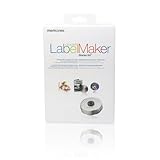
- Perfect way to get started on creating custom designs for discs, jewel cases, and DVD storage cases
- Patented 3-in-1 label applicator with a lock down center piston
- The software allows you to choose from over 1600 backgrounds, clip art, and symbols
- Compatible with Windows 98SE/Me/2000/XP
- Software and 20 disc labels, 10 slim or 5 standard jewel case inserts
Product Description
Memorex Label Maker Starter Kit… More >>
E-Stand LD09 W White/Black Laptop Table
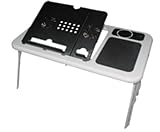
- Height and angle adjustment for maximum comfort and two powerful but silent USB powered laptop cooling fans
- Integrated mouse pad, cup platform, and pen holder
- RoHS compliant plastics with metal reinforcing, maximum load of 35 pounds
- Suitable for any size laptop
- Set up in seconds
Product Description
This E-Stand Lap Top Table is more than an innovative, portable, performance laptop table. It is the ultimate laptop workstation. With flexible height and angle adjustments, this lap top table adapts to fit your optimal comfort level in just seconds. Dual built-in USB-powered fans cool your laptop to increase performance and prevent overheating. The E-Stand lap top table is suitable for any size of laptop and has an integrated mouse pad, cup platform and pen holder…. More >>