Acer Liquid New Impression – Spesification

Acer Liquid
Acer Liquid

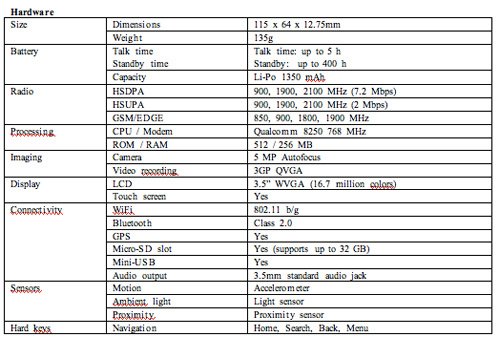
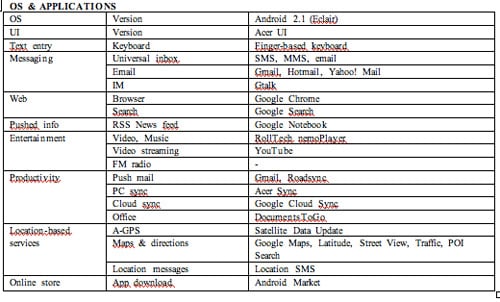
Acer Liquid e features the latest Android™ 2.1 Operating System (aka Éclair). Building on the processing and graphical capabilities of the Qualcomm™ Snapdragon™ and its high definition screen, Liquid e is the state-of-the-art for multimedia, web browsing, and social media integration. It should thrill both avid users of internet on-the-go and new users eager to experience the rich possibilities offered by this innovative device.

This appealing high definition smartphone is the ideal solution for users demanding the best from their devices and in particular for high-definition video playback or streaming, gaming and browsing smoothly rich-content internet sites.

What’s new on Liquid e with Android Éclair 2.1:
• Home screens – The new version now handles five home screens by default, allowing users to easily install more applications from the rich selection available on the Android Market, as well as shortcuts and widgets;
• Quick Contacts – a feature that lets users easily switch between the address book and the social network applications;
• Live wallpapers to customize your Liquid e on the fly;
• A new keyboard layout with an extended dictionary for predictive input;
• An updated version of the Android browser, supporting HTML5, double-tap zooming, video tagging support and geo-location API support.

With its 3.5″ high-definition capacitive touch screen, Acer Liquid e offers an unparalleled experience when watching pictures or videos, and proposes an abundance of new applications on Androidâ„¢ Smart Handhelds – games, professional applications and web applets that will enrich the end user experience.

Powered by the powerful Qualcommâ„¢ Snapdragonâ„¢ processor, Acer Liquid e provides instant access to web pages, smooth streaming of videos or music, and instant response from popular mail, maps and search applications. The high-speed processing capabilities and high-speed internet access (HSPA) of Snapdragonâ„¢ brings to life the Androidâ„¢ experience: no idle-time, almost instant uploads of web pages and downloads of rich multimedia content. The developer community can now take full advantage of these capabilities to bring to market innovative applications that demand raw computing power and superior handling of 3D graphics.
How Property Management Software Can Help Your Business

You can use property management software to assist you in your job which can help you do you job functions much faster and easier and then with standard spreadsheets. You can install the software within a few minutes and began to use an almost immediately, and by using it you are able to put your attention to more important pass.

When you choose to use online software, like from thepropertymanagementsoftware.com, you use a secure system that allows you to mark who has paid their rent and what repairs need to be done on the property. This can free up your time in order to the make the property perform better than you to work more efficiently.

Part of the service is for residents in which you can keep tabs on who has paid rent or even use software to add on late fees per day to the account which keeps you from having to do it but manually. Your residents can also be set up with an account in which they can view how much is owed on the account and can set up to directly deposit to payments to your bank account. This can be a fantastic time saver for your office workers since they will not be required spend as much time on rental payments.

You are also able to assign and look over work orders from your crew so that you can approve what is being done. This can let you communicate emergency work the is scheduled to be done directly to your personnel which can help you save money to specially if there is something that needs to be done quickly. The system can make sure that the work is being done in its timely fashion.

This type of software lets you do to major functions of your job in one place efficiently. By using this software you can better assist your renters an manage the main unscrew more efficiently. This software can make the everyday functions of the job fast and easy.

The report function let you be able to print out graphs and other charts which enables you to easily see visually high you properties are performing. You can look at the financial aspects, the repair aspects or even individual renters in these reports to make sure that your property is being managed in the most efficient way possible.

By choosing to go online with your software, you not only save memory on your computer but you are also able to not have to so any Installation or upgrading to the software since you are automatically offered the most up to date version when you log in. You will be able to log in from anywhere on any computer allowing you to check on your properties even if you are not physically on the location.

Property management software gives you the ability to manage them easily while cutting out much of the paperwork is required the bread sheets. You’re able to focus on making the property the best they can be because the software will reduce much of your labor required to run the office.

Property management software can make your job as the landlord easier and save you time on paperwork and in that job functions. Get Control of Your Homeowners Association, with Property Management Software, now!

Android With application adobe air

Fundamentally, the idea is to get Adobe AIR on as plenty of smartphone platforms as possible because the more support it’s, the easier it’ll be to take off. AIR apps performance appears to be snappy & is as close to ‘native’ as possible. Check out the video after the jump to see for yourself. Adobe AIR will come to Android first, exactly when they don’t know.

Flash has been reported to come & is still expected to come to Android but the bigger news might be Adobe announcing that they are going to bring Adobe AIR (Adobe Integrated Runtime) to Android. AIR will permit developers to create two AIR-based application & be able to reach every platform. There’ll be no need to tweak an app for each OS because the app would run in the AIR environment–an AIR app would essentially be platform-free.

Adobe Air
Adobe Air

MeeGo From Nokia And Intel

okia and Intel have decided to continue their work together by launching a new mobile platform. MeeGo is a merger so to speak between Intel’s Moblin and Nokia’s Maemo Linux platforms. as expected the joint Intel and Nokia announcement came at MWC this year and we are already interested to see what MeeGo will bring us.

MeeGo is supposed to power smartphones, MIDs, netbooks and other mobile devices. No product has been made public so far but we are told that the best of two worlds, Moblin and Maemo, will be mixed and ultimately it is us, the customers who should benefit from intel’s and Nokia’s new creations.

On top of everything we’ll find the Qt app development and we are promised access to both the Nokia Ovi Store and the Intel AppUp Center. The first MeeGo tool will be obtainable at some point in the next quarter and it will hit stores by the finish of the year. We’ll bring you more details as soon as Intel or Nokia select to unveil the first MeeGo mobile tool.