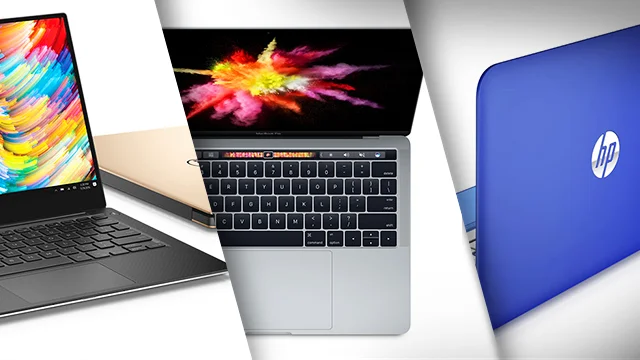
Guidelines to Buy Cheap Laptop – Refurbished or Used One

‘Refurbished’ laptops are indeed more affordable than new laptops, and with (some) good refurbishment it makes no difference or function from a new machine. However, there are significant differences between ‘used’, and refurbished laptops, so it can sometimes be difficult to tell the difference. In this article, we’ll talk about refurbished laptops and what to look for to help you find one that’s good, or even like new.

What Is a Refurbished Laptop?
Refurbished laptops are laptops that are used or that have been removed from the box, cleaned, repaired, and put up for resale. There are types of reconditioning that are carried out by the laptop manufacturer itself (or often called the ‘manufacturer’), and there are also those that are carried out by third parties (sellers). Refurbished laptops are usually sold at a significant price difference compared to new laptops of similar type/specs. The main question people often ask is “Is that refurbished laptop still good or worth using?” Here are a few ways to find a good, refurbished laptop.

Distinguish Between Used and Refurbished Laptops

Refurbished and used laptops are not the same, but most refurbished laptops have been used before, aka used. In some cases, certain parties may have taken the computer out of the box for a reason (eg for display or exhibition purposes), in which case the seller may sell it as refurbished but not new. Laptops that have been used and returned to stores are prime candidates for the refurbishment process.

Before being sold as refurbished laptops, laptops are usually inspected for cosmetic repairs, tested to ensure full operation, repaired (replacement of parts) if necessary, and cleaned. In some cases, internal components will be replaced or upgraded even if they are still in good working order. Usually a ‘factory-reset’ is also carried out, with the installation of a new/fresh operating system. This section is important if someone previously used the laptop because you don’t want to buy a refurbished laptop that still has a lot of data from the previous owner.

Where to Get/Buy a Reconditioned Laptop

When choosing a refurbished laptop, it’s important to consider the seller. If a laptop is factory refurbished, then the process is done by the same manufacturer that made the laptop. It’s likely a laptop that has been unboxed basically new and just tested to make sure it works, or it may have been sent back damaged, repaired, tested, cleaned, and available for sale at a discount. Manufacturers usually provide detailed information about their repair process and offer the best guarantees.

Some distributors/resellers also have repair or renewal programs, where the retailer renews the laptop or contracts with a third party to do so. For example, a third-party service provider may join a ‘refurbishment’ program to sell refurbished laptops and other electronics through a marketplace. Programs like this usually have strict requirements, so you can keep track of what’s going on during the repair process. Sellers who provide refurbished laptops usually have their own service center and carry out the process independently (which will also function as a service center if problems are encountered in the future).

Obtained Guarantee

The warranty period varies from seller to seller, and some laptops are not covered by a warranty at all. New laptops usually come with a one-year warranty, and that’s what you should look for in a refurbished model (when possible). Although refurbished laptops are technically not new, they are sold in a variety of conditions, from ‘like new’ to ‘battered’, so sellers must be willing to provide support and comfort to buyers, especially after purchase (after sales service). Some vendors provide warranties of up to several months (with certain conditions), and some as little as a few weeks or days (usually for checking and testing).

Conditions and Equipment
The condition of the laptop will depend on whether it has been used by someone else before (second hand), and if so, how the former owner behaved in using it. An adequate repair process will return a used laptop to like-new condition, but there may be some cosmetic issues such as scratches, peeling paint or dents that cannot be repaired. The refurbished laptop chosen should ideally be clean and free of physical defects, as this is the first indicator of past usage behaviour.

Refurbished laptops should also be cleaned internally (of dust/dirt etc.), tested, and repaired. Any components that are not working properly should be replaced, and those that are working properly should be cleaned. In the end, a refurbished laptop should look and function like it did when it was new. It may lag behind in components and performance compared to newer models, but it should work as well as it did when it was new.

Some sellers will give their laptops a grade or condition with words like ‘like new’, ‘BNOB’ (brand new out of box), ‘grade A’, or other terms. Pay attention to specific terminology, because each rating level has its own criteria that reflect the item you want to buy.

Model/Specifications and released year

The specifications and model (what year) you get will of course depend on the budget you have. However, in essence, buying a refurbished laptop as an alternative is a way to save money, by getting the best (laptop) performance for the money you have, compared to buying a new one.

If your needs revolve around running basic tasks like word processing (Office suite) and surfing the internet, you can safely look at refurbished laptops that are older or with lower specifications (ideally, no older than 5-6 years). However, to play the latest games, as much as possible look for reconditioned laptops released in the last 1-2 years, to be able to keep up with the needs of the latest games.

Apple laptops tend to last longer, but you can still experience performance issues after more than five or six years. The main problem is that recent versions of macOS usually only run-on Macs made within the last eight years. Buying a refurbished old MacBook will eventually lock you out of new operating system updates even if the laptop still works fine, or alternatively you can install another operating system to keep it running with security updates (such as Ubuntu or LinuxMint).

Closing

Buying a reconditioned laptop can save costs and provide excellent performance compared to new prices, so it is a good choice for many people, such as students, parents (who want to look for home or school children’s needs), gamers with a mediocre budget, to ‘hunter hunters’.

When you buy a reconditioned laptop, there are several things that must be done immediately to maximize its use, such as:

– Check all functions and completeness, whether they are in accordance with the conditions when they were new, or according to the seller’s description

– Ensuring a fresh operating system, no data (or possible viruses) left behind from the old owner

– Install applications/software according to your needs, and transfer data for use

– Upgrading possible components (such as RAM, or additional storage drives), if there is still some budget left.

Regarding the selection of sellers, try to buy them at authorized stores or official stores that provide direct manufacturer reconditioned goods, or if you buy online from a marketplace, make sure the seller has a good sales history (reputation), provides a fairly fair guarantee, and has a service center in the event of Complain even when you don’t want it.


Android Verified Calls new features

In case you’re hoping to get much more protection on your Android telephone, you should empower Google’s Verified Call highlight right away.

Confirmed Calls is Google’s method of intensifying guest ID so that you can rapidly tell if a guest is an authentic business or not. With this element now accessible, organizations can join to utilize Verified Calls which causes it workable for them to better to educate you why they are calling. At the end of the day, you won’t need to answer the call to know why that genuine business is attempting to get in touch with you.

For clients, it’ll help make it simpler to dodge spam calls and make it conceivable to promptly confirm if a call is from an organization they trust. For organizations, this new element can expand call answer rates and could assist work with trusting among you and potential customers/purchasers.

Requirement

The element began turning out to Android in September and is just accessible for the Google Phone application. In the event that your gadget works with stock Android you ought to be a great idea to go. Notwithstanding, if your Android telephone of decision is a Samsung (or from another maker that utilizes an alternate telephone application), you’ll have to introduce the Google Phone application from the Google Play Store. Without the Google Phone application, you can’t utilize this component – one that many will inevitably be viewed as an unquestionable requirement have.

Instructions to empower the Verified Calls highlight

To empower the Verified Calls highlight, open the Phone application and tap on the menu button in the upper-right corner. From the popup menu, tap Settings. From the rundown of choices, tap Spam And Call Screen

The Spam And Call Screens alternative in the Google Phone Settings page.

Empowering the Verified Calls highlight.

What’s more, that is everything to empowering the Verified Calls highlight. You probably won’t notice a very remarkable change from the start on the grounds that few out of every odd business has joined up with the Google Service. Be that as it may, as protection keeps on being increasingly more critical to shoppers, administrations and highlights like Verified Calls will turn into the true norm for organizations and customers.

Inevitably you should begin seeing more data on your approaching call screen to show that it’s a confirmed business calling, however why that business is attempting to get in touch with you. In case you’re a business, hoping to take on Verified Calls, look at the official Google site for more data.

NetSpot PRO on Mac Review

Wireless networking has become the primary, and often only, connection method for many users. Here’s how to troubleshoot corresponding performance issues.

NetSpot PRO model 2.12 is a small-footprint app. The application occupies only 26MB of disk area and usually consumes much less than 8% of a CPU on my Mac when performing a survey and much less than 4% when solely discovering and amassing metrics on handy wi-fi networks. Unlike different functions and community utilities I’ve used, NetSpot PRO locates and identifies greater wi-fi connections, as well.

The new model and updates consist of guide for 802.11 ax, additionally recognised as Wi-Fi 6, consists of help for macOS Catalina and replaces the older NetSpot Wi-Fi Reporter with a new Wi-Fi scanning technology. The new version additionally consists of consumer interface improvements, energetic scanning well matched with HTTPS and subtle reports, in addition to optimized reminiscence overall performance and Retina Ready compatibility.

Just open the utility to find out wi-fi networks. The application starts performing community evaluation on startup. In addition to shooting carrier set identifiers (SSIDs), or the wi-fi networks’ names, NetSpot PRO collects corresponding Wi-Fi tools hardware addresses, or primary carrier set identifiers (BSSIDs), the wi-fi networks’ channels, and the radio bands in operation. The software additionally detects and archives the protection technological know-how in play, such as WPA2 Personal or WEP, as properly as the suspected Wi-Fi tools vendor.

That statistics alone, as proven in Figure A, is pretty beneficial for troubleshooting complex wi-fi community issues. For example, the SSID subject confirms the identify of the wi-fi networks in operation. As a advisor who’s spent years in the field, I’ve located the true community title might also no longer in shape a client’s or quit user’s recollection, so such hard-and-fast information is helpful. The identical good judgment holds proper for the safety mechanism (WPA2 vs. WPA vs. WEP, for example) in place. The channel records assists professional eyes in rapidly recognizing conversation conflicts that can manifest when two separate networks—including a earlier unknown community on the different facet of a shared wall in a public workplace building—compete for site visitors the usage of the identical channel. When such blunders are encountered, altering the wi-fi channel you administer can take away the problem.

The app’s discovery process, however, additionally captures extra records that proves indispensable for performing extra superior wi-fi community troubleshooting. In addition to shooting Wi-Fi mode (such as ac, a, n and a/n), the software collects signal-to-noise ratio stages and corresponding sign energy metrics for every get admission to factor detected. NetSpot PRO users can double-click sign levels, too, for greater facts on every AP’s unique performance. Using these metrics, you can hint malfunctioning get admission to points, decide whether or not an extra get admission to factor is wished to accommodate people in a precise location, and affirm whether or not constructing materials, walls, and different digital tools may additionally be introducing conflicts and, if so, which AP is impacted.

Using the program’s Survey feature, you can diagram and mannequin future networks or even practicable AP additions to an present network. Using a transportable router, or shifting an current AP from factor to factor whilst trying out allows amassing wi-fi sign facts for the duration of an workplace or facility.

To operate a survey, click on the Discover/Survey button to location NetSpot PRO in Survey mode. Provide area facts with the aid of loading a sector file or drawing the corresponding boundaries. Alternatively, you can use a pattern map or use a clean template. Following the prompts creates a map that captures wi-fi sign records as you go your Mac during the facility whilst performing the test.

NetSpot presents onscreen directions that simplify and information customers via the technique when performing a subject survey. The firm’s user information and on-line survey aid documentation provide a exceptional help and describe on hand alternatives for performing and customizing tests, merging a couple of image archives and making feel of the ensuing sign power information. Regardless, I discover the survey’s ensuing color-coordinated maps, as proven in Figure B, usually inform me at a look the place wi-fi indicators are going to come across bother and gain from extra strength.

The application presents different benefits, too. Using the Discover feature, you can stumble on unauthorized wi-fi get right of entry to points, pick out naming and configuration errors, and affirm how a ways past a perimeter wall your organization’s wi-fi sign is leaking.

Strategy to Pick Up Great Sound Quality Speaker

No matter if you really make music for a personal passion or if you happen to be regularly seeking a contract, you’ll need high-quality devices to save your distinct voice. As you work so faithful record the best songs, it usually is irritating once you play back the track and hear pops the location where the p’s and b’s should be. Any popping is caused by the pace which the sounds produced by the characters travels and it can take place even though you may utilize a costly microphone. Luckily, there’s a simple solution that all professional studios be aware. A pop filter can eliminate the problem and create a recording crisp and precise sufficiently to deliver it to record labels or play it with your family and friends. You will discover some great pop filters over on Amazon that can be extremely affordable for just about any under-rated performer or a musician who doesn’t have a substantial deal. Since the bothersome popping will be lacking from your recordings, you are going to no doubt become happier in your voice. You are going to additionally save time with each and every song simply because you will not need to do them repeatedly in order to avoid all the sounds as a result of air flow hitting your mic. Pop guards are really light and easily distribute noise after you make your b and p noises during your track. There is an efficient and also inexpensive

A lot of these filters work effectively for any kind of music and often will go with the majority of mics. If you save audio for other people, they will likely truly value the reality that they don’t need to reproduce their tracks several times just because of the popping.

When you purchase this specific pop shield, you will additionally receive a publication full of tips and hints for making your actual recordings as clean as you can.

The cleaner your voice, the good deal more valuable it’ll be. When you find yourself prepared to increase the standard of your own taped audio, just go to Amazon.com and consider the actual pop masks available for artists just like you. You can expect to cut back on precious time and be more thrilled by the particular way you sound on recording once you include a pop filter to your recording devices.

Faster Way to Fix Office 365 Failed activation Failed For Geographic regions Reason

Buy new laptop with Office 365 home key for 5 user in Australia and without hesitate I brought that laptop to another country without knowing office 365 need to be activated in certain region where I bought it, and without any doubt that the key original one, I just activated in Asian Country and it give me an error, and result I CANNOT ACTIVATED MY OFFICE 365!!

with reason as follow :

sorry, we can’t use this product key because your current subscription was set up in another country/region. Just Hang on to your product key until then our contact support to resolve this immediately

really annoying, try to reinstall it and even contact customer service with machine answering my question and in the end i assume i should bring my laptop back to Australia and activated there, since they detected my IP address during activation.


So, You only need to “make” your computer in Australia, so try to install free VPN, why VPN ? because it change a whole computer IP address, by passing your recent IP address as US or like me Australia


So i Download free vpn https://windscribe.com/download with 1 month free trial and only 2 Giga Limitation for download ( who cares, you only need it to activated trough your software )


after that! Im able to activated my Office 365, very noob way to activated your ORIGINAL key!!!

Hope in the future Microsoft not giving any difficulties for people who already bought it for real and get hassle during their activation process